Creating, designing, and making a robust, future-proof App is not a child's play. Many software experts work for months and years to build an App for any cause, but all this hard work comes to zero when Android and iOS stores reject the App. So, to avoid this rejection, you can take some timely actions, which are a lifesaver. So, here are seven reasons why your App could get rejected [& how to avoid/fix it]
Let's have a look!
7 Reasons why your app could get rejected
Here are seven common reasons why your App can get rejected:
1. Bugs in the App
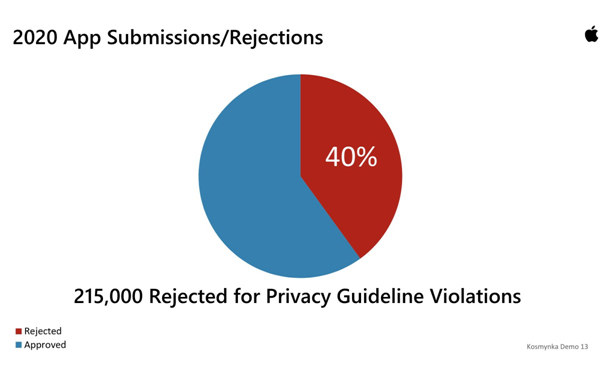
You will be surprised to know that the Apple store rejected 150,000 apps alone in 2020, and the weekly submissions were 100,000. App stores follow strict manual and digital guidelines to check the credibility of the App. So, one of the main reasons is ignoring minor bugs.
How to avoid it: To fix it, you must check long load times, crashes after using the App for a long time, and test each feature under extreme conditions. Another effective way is to launch the Beta App version so limited users can run and assess it. This will reduce your chances of App rejection considerably.
2. Insufficient information Provided
Many App developers use top DevOps tools to make a flawless App. However, they forget to submit the necessary information as they're busy with continuous hard work. App stores use your information to test the App. If they think they do not understand the purpose of your platform, they will reject it.
How to fix it: You must provide a great demo video about the working, concerned audience and capability of your App. Also, mention compatible hardware devices and other needs. Finally, you must give an actionable information environment in which your apps work best. App store testers will not try to know how your App works and its nature; they solely depend on your provided information.
3. False Metadata
An average mobile user spends five to six hours daily on mobile; with phones being a great source of help in daily tasks, App stores want to become the best. That's why they check every minute detail, just like the title and description of your application and the screenshots you upload.
How to avoid it: A check-in time can save this trouble as the information, screenshots and links you provide around the App must be relevant. It should resonate with the purpose of the App and shouldn't give users false hopes.
4. Careless Privacy Practices
App developers try to discover a viable mobile App idea but certainly forget privacy policies. As already mentioned, Apple and Google App stores are very strict with privacy policies. Therefore, any loophole can lead to app rejection.
How to avoid it: Be transparent in your App, don't ask for permission which doesn't have to do anything with Apps functioning. You must have a clear-cut privacy policy, ask for information, and tell users how it will not be shared anywhere. Never practice seizing and transferring personal user data.
5. Copying Other Apps
If you love a concept of a particular App, you can, ofcourse, use it in your App. But, creating the same App with the same features, design etc., will lead to app store rejection. This will be a pure act of copying the App.
Even if your concept is similar, try adding your uniqueness to it. Along with the idea you like, you and add some additional ones. Even using the best cross-platform app development frameworks of 2022 and creating the same UX design with the same icons and colours will lead to failure.
How to avoid it: At least differentiate your App regarding UX design to fix it. It must have its unique interface and an evolved idea. This will reduce the chance of App rejection due to copying to almost negligible.
6. Not Reading the Guidelines
In the excitement of designing the perfect App, many developers forget to read specific guidelines for the particular launching platform. For example, Apple has a set of agreements and guidelines for Apple developers. If you don't abide by any, your App certainly will be rejected.
How to avoid it: Read each guideline carefully and perform it so you don't break any rules. This will help you pass the test, and the respective App store will cite you as a reliable App.
7. Not Checking Language and User-generated Content
If your App has a feature to upload images, reviews, comments, etc., you must provide users to stop inappropriate content. Therefore, an appropriate system that helps users eliminate bad elements is necessary.
How to fix it: Bring on the block, spam, red flag etc., option in your images, review and comments section. It will make your platform perfectly healthy and significantly reduce the chances of rejection.