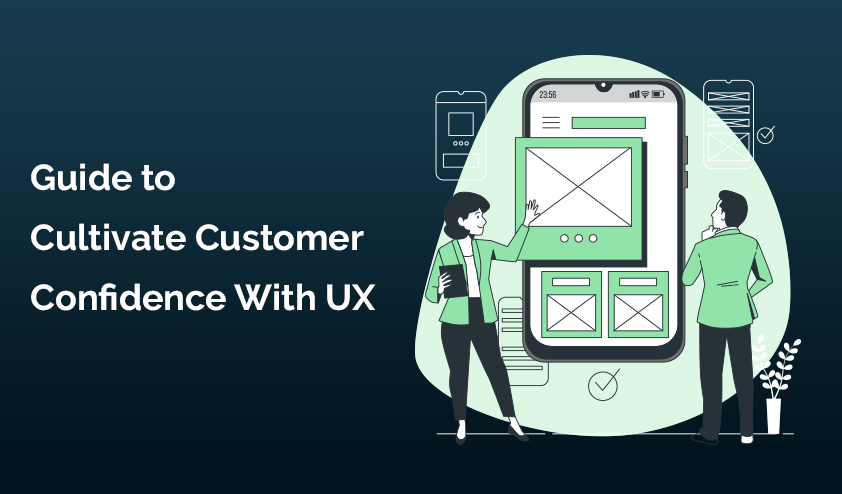
Did you know UX designs can boost customer confidence for your business? Customer confidence is one of the most important factors for any business growth. If it's good, customers are likely to rely on your services in the future.
While traditional practices like customer need anticipation and easy buying experience are important, we cannot discourage the power of designing. UX designing can engage the customers and increase their confidence to take action. Wondering how it works? Let's check out:
How does UX design help to gain customer confidence?
UX design is where developers create products or services that provide a good user experience to the customers. From branding to usability, it works on relevant components to provide a good end result to users.
With 88% of shoppers rejecting a website due to bad user experience, having a user-focused UX design can ensure engagement. This could further contribute to their recurrent visits and eventually result in a purchase. Simply put, they will consider you more reliable for their product and service requirements.
How to cultivate customer confidence with UX?
Now that you know the importance of UX design in customer confidence, let's see how you can do so:
#1 Usability
A complex or intricate website with too many components loses a potential customer. Period. Whenever some users visit your website, they look for an intuitive experience. If it's so, great! You boost your sales. But, if it's not, they will leave your website and may never return back.
Even if you are upgrading the website, do not include any complexities. Try to maintain the same user experience or modify it to make it better. Ensure that all elements like CTAs, contents, information, logos, etc., are present on the website. As per a survey, around 94% of respondents considered easy navigation a useful website feature. So, do not forget to maintain the same.
#2 Well-constructed about page
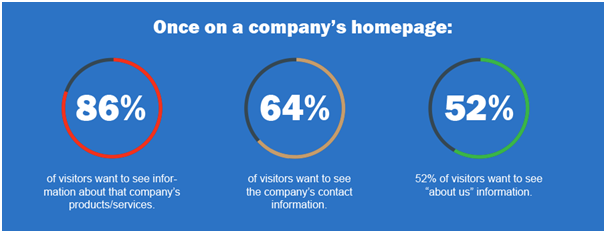
Whenever a customer wants to know about a website, they navigate to the About page. Thus, it's important for an About page to be top-notch. By that, we don't mean just the content but also other aspects like images, headers, and footers.
First, the content should be to-the-point covering all the relevant details that a customer wants to know. You can use content management systems to take care of that part. Then, the images should be authentic and relatable for the customers instead of being generic. Users should feel instantly connected!
At the footer, it should include contact details, sub-pages, FAQS, and other required information. When customers get the information they want, they gain the confidence to take further action which later increase the website conversion rate.
#3 Prevent any errors
Do you know what turns off a customer? When they see errors on their screen while navigating through the websites. Understand it this way, how distressing would it be if you board a cab and the seats are unclean? A lot! You would never board a cab from the same company again. Here it's the same. If your visitors notice broken links or errors on their screen, they would instantly switch to some other website.
Another issue is the not secure warnings. As per a study, around 64% of users leave a website when they see a "not secure warning" on visiting a website. And, of course, that eventually results in less customer confidence.
To prevent such scenarios:
- Check the website from the user's end.
- Go through both essential and less-relevant parts to ensure you are safe from all sides.
- Upgrade the website to HTTPS for security.
#4 Product price
Customers hate loitering across websites to get relevant information. That's because they expect it to be mentioned right at their eye front. Get it this way; suppose you want to purchase a product from an eCommerce website. You look for the cost details, and it isn't displayed beside the product. Then, you navigate throughout the page and nothing! But, once you checkout, you see it mentioned in the final details. You then notice that it's way more expensive than your budget. What does this mean? Loss of time, effort, and even the enthusiasm to buy the product.
Also, would you ever return to the website for another purchase? Of course not! The same is applicable here. If users don't find relevant details like cost, description, specifications, etc., at their eye front, they lose customer confidence and bounce through.
#5 Promises and security
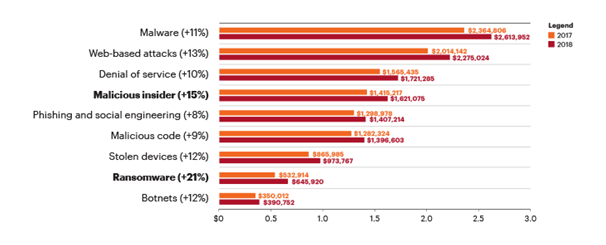
As per a 2019 report, security breaches have surged by 67% over the last five years. Thus, it's important for the users to know that they are not susceptible to such occurrences. For that, make sure to mention the business goals and security details clearly.
Is it spam-protected? What about data encryption? Does it store your personal details? Users should know this information to ensure that they are on a reliable website. Simply put, they should consider you trustworthy to gain customer confidence.
Conclusion
That's it! Make sure to follow these UX design steps, and hopefully, you will develop customer confidence easily.